MediaFlow for Laravel Documentation
Universal media management infrastructure, provider-agnostic storage adapters, modern Blade shortcut input components, on-demand format conversion & compression, and hardware-accelerated 3D upload lifecycle visualization.
🌊 1. Overview & Architecture
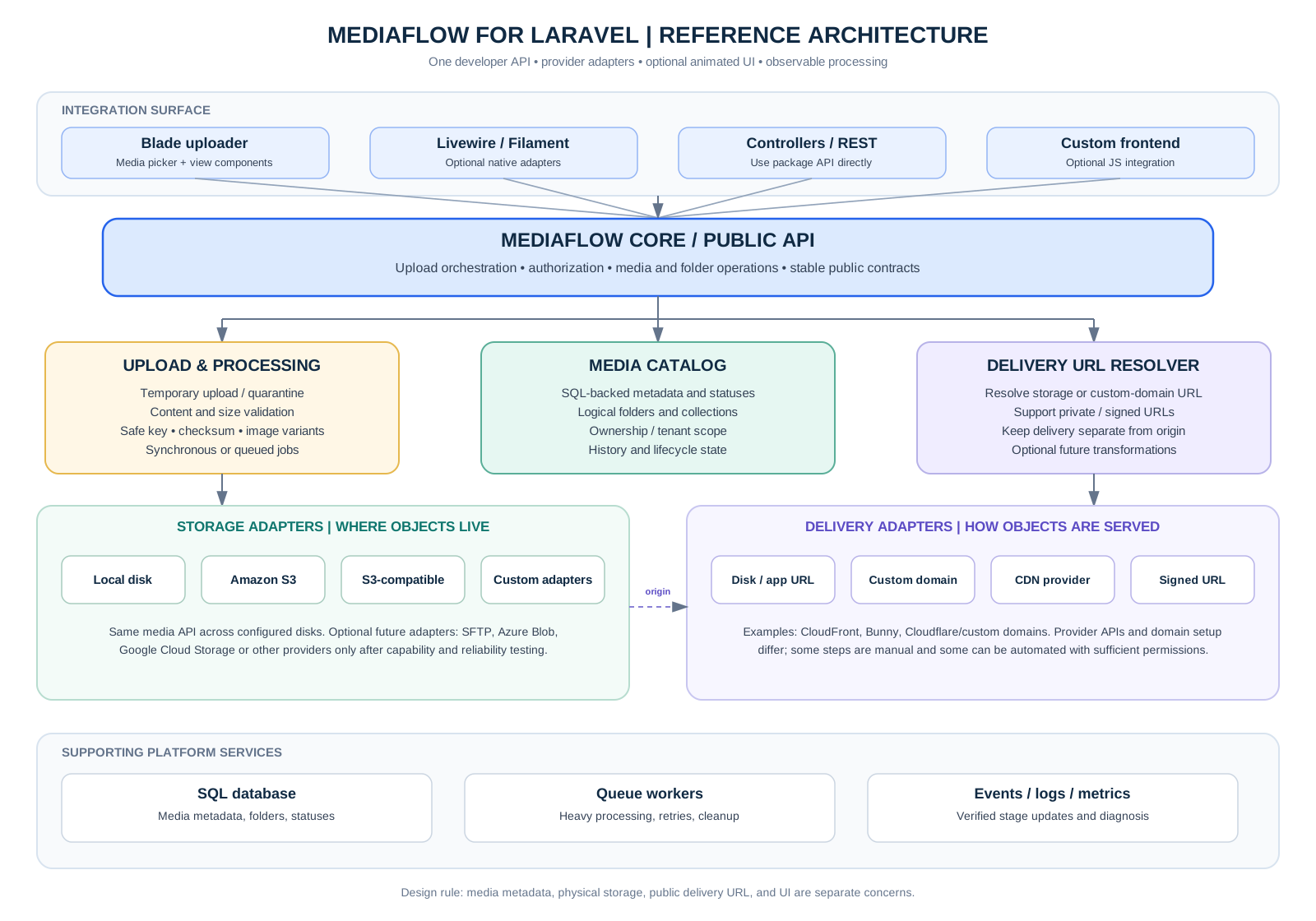
MediaFlow solves media handling in modern Laravel applications without coupling business logic to underlying storage providers. It provides a clean boundary between Physical Storage Persistence (Local disks, S3, Cloudflare R2, MinIO) and Delivery URL Resolution (Public disks, custom CDN edge endpoints, or time-limited signed streaming).
📋 2. System Requirements
| Component | Requirement | Notes |
|---|---|---|
| PHP | ^8.2 | ^8.3 |
Tested on PHP 8.3.33 with OPcache |
| Laravel Framework | ^11.0 | ^12.0 | ^13.0 |
Standard Laravel package auto-discovery enabled |
| Database | SQLite 3.35+, MySQL 8.0+, or PostgreSQL 14+ | Stores media catalog, folder trees, variants & settings |
| PHP Extensions | fileinfo, gd or imagick, exif |
MIME sniffing, EXIF stripping, WebP thumbnails & compression |
⚡ 3. Step-by-Step Installation
Follow these simple steps to install MediaFlow in your Laravel application:
Step 1: Install via Composer
composer require dwivedianuj9118/mediaflow-laravelStep 2: Publish Package Config, Migrations & Assets
# Publish configuration file (config/mediaflow.php)
php artisan vendor:publish --tag=mediaflow-config

# Publish database migrations
php artisan vendor:publish --tag=mediaflow-migrations

# Publish CSS and JS assets to public/vendor/mediaflow
php artisan vendor:publish --tag=mediaflow-assets
Step 3: Run Database Migrations
php artisan migrateStep 4: Create Public Storage Symlink
php artisan storage:link⚙️ 4. Configuration & Environment Variables
MediaFlow is configured via config/mediaflow.php or environment variables in your .env file:
# Route prefix for media manager and upload endpoints (default: mediaflow)
MEDIAFLOW_ROUTE_PREFIX=mediaflow

# Storage persistence disk ('public', 's3', etc.)
MEDIAFLOW_DISK=public

# Maximum upload file size in kilobytes (default: 20480 = 20 MB)
MEDIAFLOW_MAX_FILE_SIZE_KB=20480

# Delivery Driver: 'disk' for storage disk URL, 'cdn' for custom CDN host
MEDIAFLOW_DELIVERY_DRIVER=disk
MEDIAFLOW_CDN_URL=https://cdn.example.com

# Access Control & Guard enforcement
MEDIAFLOW_AUTH_ENABLED=false
MEDIAFLOW_AUTH_GUARD=web
MEDIAFLOW_AUTH_ROLES=admin,editor
📥 5. Shortcut Input Tag: <x-mediaflow-input>
The shortcut input component creates a drop-in file selector and upload box for any Blade form. It includes drag-and-drop, native file browsing, instant 3D upload animation trigger, an existing library picker modal, and a hidden input binding the media ID to standard POST form requests.
Basic Usage
<form method="POST" action="/articles">

    <div class="form-group">
        <label>Article Title</label>
        <input type="text" name="title" class="form-control" required>
    </div>

    @
    <x-mediaflow-input
        name="cover_media_id"
        label="Featured Cover Image"
        help="Drag & drop an image or select from your media library."
        :required="true"
    />

    <button type="submit">Save Article</button>
</form><x-mediaflow-input ... /> and <x-mediaflow::input ... /> are registered and can be used interchangeably.
All Supported Component Attributes
| Prop | Type | Default | Description |
|---|---|---|---|
name |
string |
'media_id' |
The form field name submitted in the POST request (carries media ID integer). |
label |
string|null |
null |
Field label text rendered above the dropzone with optional required asterisk. |
value |
mixed |
null |
Initial selection. Accepts a Media model instance, media ID integer, or URL string. |
compact |
bool |
false |
Optimized layout for sidebars, off-canvas drawers, and narrow admin panels (≤ 340px). |
picker |
bool |
true |
Displays the "🗂 Browse Library" modal button to choose existing files without re-uploading. |
accept |
string |
'image/*' |
MIME type filter for the browser file chooser dialog. |
folder |
string|null |
null |
Target folder slug or UUID for files uploaded through this input box. |
collection |
string |
'default' |
Target media collection classification name. |
required |
bool |
false |
Renders required indicator asterisk and adds form validation attributes. |
help |
string|null |
null |
Subtle helper text rendered beneath the dropzone. |
📐 6. Side Admin Panel & Drawer Compatibility
Administrative side panels and slide-over drawers (typically 280px to 340px wide) often suffer from horizontal clipping, oversized icons, and modal clipping caused by parent overflow: hidden or CSS stacking contexts. MediaFlow provides native solutions:
Compact Mode (:compact="true")
<div class="admin-sidebar-drawer" style="width: 320px;">
    <h3>Quick Post Editor</h3>

    @
    <x-mediaflow-input
        name="sidebar_thumbnail_id"
        label="Sidebar Thumbnail"
        :compact="true"
        help="Scaled for narrow panels (280px-340px)."
    />
</div>document.body with z-index: 9999999 !important;. This prevents sidebar CSS rules like transform, filter, or overflow: hidden from clipping dialogs.
🔗 7. Model Binding & Pre-populated Values
When editing existing resources, pass the relation or integer ID to :value. MediaFlow will automatically render the preview card with the file thumbnail and replace button:
<x-mediaflow-input
    name="cover_media_id"
    label="Cover Image"
    :value="$post->coverMedia ?? old('cover_media_id')"
/>
Saving in Controller
public function store(Request $request)
{
    $validated = $request->validate([
        'title' => 'required|string|max:255',
        'cover_media_id' => 'required|exists:mediaflow_media,id',
    ]);

    $post = Post::create($validated);

    return redirect()->route('posts.show', $post);
}
📤 8. Standalone Uploader: <x-mediaflow::uploader>
For multi-file drops, mass document uploads, or dedicated batch upload cards, use the standalone uploader component:
<x-mediaflow::uploader
    folder="gallery/products"
    collection="product_shots"
    accept="image/*,application/pdf"
    :multiple="true"
    :animated="true"
/>
🗂️ 9. Explorer & Media Manager: <x-mediaflow::manager>
MediaFlow includes a desktop-class explorer interface featuring folder tree navigation, search, file type filters, file metadata inspector, and selection modes:
Standalone Gallery Component (<x-mediaflow-manager>)
To embed only the media manager/gallery inside any custom admin view, dashboard card, or modal without any outer navigation wrappers:
<x-mediaflow-manager />Asset Directives for Master Layouts
<head>
    @mediaflowStyles
</head>
<body>
    @yield('content')

    @mediaflowScripts
</body>
Clean & Headerless Built-In Route Modes
By default, the route /mediaflow/manager is completely clean (dev navigation links to documentation and pipeline are hidden). You can also run it completely headerless for iframe modals:
# 1. Completely Headerless (for iframes or embedded modals)
/mediaflow/manager?clean=1

# 2. Pure Grid Mode (hides top upload dropzone, shows only folders & files)
/mediaflow/manager?no_uploader=1
Modal Picker Mode with JavaScript Events
document.addEventListener('mediaflow:selected', (e) => {
    const media = e.detail;
    console.log('Selected media ID:', media.id);
    console.log('Full Delivery URL:', media.url);
    console.log('Thumb WebP URL:', media.thumbnail);
});
🎨 9b. Theming, Media Folder Colors & Light / Dark Modes
MediaFlow is built to seamlessly adapt to any host design system, Laravel Breeze/Jetstream/Filament dashboard, or custom CSS theme. You can customize the media picker accents, folder icon badges, and force light or dark modes in 4 different ways:
Option 1: Global Admin Dashboard Settings
Visit /mediaflow/settings (Appearance & System Design Inheritance) to select your preset color, custom hex code, folder color, and Light/Dark mode with real-time live preview. These settings are stored in your database and applied automatically across all views.
Option 2: Blade Component Props
Customize individual input components or media managers directly via Blade props:
<x-mediaflow-input
    name="cover_image"
    theme="emerald"
    mode="dark"
    folder-color="#3b82f6"
/>


<x-mediaflow-input
    name="avatar_id"
    theme="violet"
    mode="light"
    folder-color="#f59e0b"
/>


<x-mediaflow::manager
    theme="custom"
    color-mode="dark"
    folder-color="#10b981"
/>
Option 3: Automatic Host App Class & Attribute Inheritance
MediaFlow automatically detects your host application's dark mode without any configuration:
- Tailwind CSS Dark Mode: If your
<html>or<body>hasclass="dark", MediaFlow instantly switches to dark mode. - Custom Data Attributes: Supports
data-theme="dark"(DaisyUI / theme switchers),data-mf-mode="dark", ordata-mf-mode="light". - OS / Device Preference: Automatically respects
@media (prefers-color-scheme: dark)when in System mode.
Option 4: CSS Custom Variables (Design Tokens)
Override MediaFlow's CSS variables anywhere in your app stylesheet:
:root {
    /* Primary Accent Color (Picker borders, buttons, badges) */
    --mf-primary: #8b5cf6;
    --mf-primary-hover: #7c3aed;
    --mf-primary-light: rgba(139, 92, 246, 0.12);

    /* Media Folder Icon & Background Colors */
    --mf-folder-color: #f59e0b; /* Amber Gold */
    --mf-folder-bg: rgba(245, 158, 11, 0.14);
}

/* Host Dark Mode Tokens */
html.dark {
    --mf-bg-main: #0b0f19;
    --mf-bg-card: #131b2e;
    --mf-border: #1e293b;
    --mf-text-main: #f1f5f9;
}
⚡ 10. PHP Developer API & MediaFlow Facade
Interact directly with the MediaFlow engine in controllers, background queued jobs, or console commands:
use MediaFlow\Laravel\Facades\MediaFlow;

// 1. Upload a file from HTTP Request
$media = MediaFlow::upload($request->file('photo'), [
    'disk' => 'public',
    'folder' => 'avatars',
    'collection' => 'profiles',
    'thumbnails' => true,
]);

// 2. Create hierarchical folder
$folder = MediaFlow::createFolder('2026 Campaigns', $parentFolderId = null);

// 3. Move media to folder
MediaFlow::move($media, $folder->id);

// 4. Rename media display name
MediaFlow::rename($media, 'hero-banner.webp');

// 5. Delete file, physical disk objects & thumbnail variants
MediaFlow::delete($media);
📦 11. Media Model Helpers & Eloquent Relations
Defining Relationships in Your Models
namespace App\Models;

use Illuminate\Database\Eloquent\Model;
use Illuminate\Database\Eloquent\Relations\BelongsTo;
use MediaFlow\Laravel\Models\Media;

class Post extends Model
{
    protected $fillable = ['title', 'cover_media_id'];

    public function coverMedia(): BelongsTo
    {
        return $this->belongsTo(Media::class, 'cover_media_id');
    }
}
Accessing Media URLs and Thumbnail Presets
@
<img src="{{ $post->coverMedia->url() }}" alt="{{ $post->title }}">

@
<img src="{{ $post->coverMedia->thumbnailUrl('thumb') }}" loading="lazy">
<img src="{{ $post->coverMedia->thumbnailUrl('medium') }}">

@
<span>File size: {{ $post->coverMedia->human_size }}</span>
🗜️ 12. On-Demand Image Optimization & Conversion
Convert any stored image (PNG, JPEG, GIF) to modern WebP or AVIF format with custom quality sliders. Supports both creating an optimized copy or replacing the original in place:
$result = MediaFlow::optimize(
    $media,
    'webp',       // format: 'webp', 'avif', 'jpeg', 'png'
    80,           // quality: 10 - 100
    false         // replace original: true or false
);

// Metrics returned
$savings = $result['metrics']['savings_percent']; // e.g. 94.6%
$optimizedMedia = $result['media'];🛡️ 13. Access Control, Guards & Roles
Protect media operations using Laravel's native authentication guards, Spatie permissions, Gates, or custom middleware:
Configuring Authentication
'auth' => [
    // Enforce authentication for media manager routes
    'enabled' => env('MEDIAFLOW_AUTH_ENABLED', false),

    // Selected Guard: 'web', 'admin', 'api', or null
    'guard' => env('MEDIAFLOW_AUTH_GUARD', 'web'),

    // Allowed Roles (checks $user->role or Spatie hasRole)
    'roles' => ['admin', 'editor'],

    // Optional permissions or gates
    'permissions' => ['manage-media'],
],
Custom Closure Authorization
Register custom gate rules in AppServiceProvider:
use MediaFlow\Laravel\Facades\MediaFlow;

public function boot(): void
{
    MediaFlow::authorize(function ($request) {
        // Return true to allow, false to deny
        return $request->user()?->is_admin || $request->user()?->can('access-media');
    });
}
☁️ 14. 10 Cloud Storage & CDN Provider Presets
MediaFlow includes built-in driver auto-configuration for 10 major cloud storage and CDN providers. You never need to write manual S3 endpoint calculations or path-style configurations: MediaFlow dynamically bootstraps the mediaflow_cloud disk at runtime based on your selected preset.
3-Field Quick Setup: Key, Secret & Public URL
Just provide your credentials and bucket: MediaFlow handles regional endpoints, virtual-host vs. path-style routing, and public delivery formatting automatically:
| Provider | Protocol / Driver | Default Region | Key Field | Secret Field | Bucket Field | Recommended Public URL / CDN |
|---|---|---|---|---|---|---|
| ⚡ Cloudflare R2 | S3 API (Zero Egress) | auto |
R2 Access Key ID | R2 Secret Access Key | R2 Bucket Name | https://cdn.yourdomain.com |
| 📦 AWS S3 | AWS S3 + CloudFront | us-east-1 |
AWS Access Key ID | AWS Secret Key | S3 Bucket Name | https://xxxx.cloudfront.net |
| 🌐 Contabo | Path-Style S3 | eu2 |
Contabo Access Key | Contabo Secret Key | Contabo Bucket Name | https://eu2.contabostorage.com/{bucket} |
| 🌊 DigitalOcean Spaces | Spaces Edge CDN | nyc3 |
Spaces Access Key | Spaces Secret Key | Space Name | https://{bucket}.nyc3.cdn.digitaloceanspaces.com |
| 🔥 Wasabi | Hot Cloud S3 | us-east-1 |
Wasabi Access Key | Wasabi Secret Key | Wasabi Bucket Name | https://s3.us-east-1.wasabisys.com/{bucket} |
| 💾 Backblaze B2 | B2 S3-Compatible | us-west-004 |
keyID | applicationKey | B2 Bucket Name | https://f000.backblazeb2.com/file/{bucket} |
| ☁️ Google Cloud Storage | GCS S3 Interop | auto |
HMAC Access ID | HMAC Secret Key | GCS Bucket Name | https://storage.googleapis.com/{bucket} |
| 🔷 Azure Blob Storage | Azure Blob API | auto |
Storage Account Name | Account Access Key | Container Name | https://{account}.blob.core.windows.net/{container} |
| 🎨 Cloudinary | Media CDN | global |
Cloudinary API Key | Cloudinary API Secret | Cloud Name | https://res.cloudinary.com/{cloud_name}/image/upload |
| 🦙 MinIO | Self-Hosted S3 | us-east-1 |
Root User / Key | Root Pass / Secret | MinIO Bucket Name | http://localhost:9000/{bucket} |
Live Connection Probing (Zero Risk)
MediaFlow includes an active credential probe directly inside the Settings page (/mediaflow/settings) and via REST endpoint:
.mediaflow-probe-[uuid].tmp), immediately reads and verifies it, deletes the file, and returns the measured millisecond round-trip latency. All secret credentials are encrypted in transmission and scrubbed/redacted from error outputs.
const res = await fetch('/mediaflow/settings/test-provider', {
    method: 'POST',
    headers: {
        'Content-Type': 'application/json',
        'X-CSRF-TOKEN': document.querySelector('meta[name="csrf-token"]').content
    },
    body: JSON.stringify({
        provider: 'cloudflare_r2',
        key: 'your_r2_access_key_id',
        secret: 'your_r2_secret_access_key',
        bucket: 'my-production-bucket',
        endpoint: 'https://<account_id>.r2.cloudflarestorage.com',
        public_url: 'https://cdn.example.com'
    })
});

const result = await res.json();
console.log(result); // { success: true, latency_ms: 142.5, message: "✓ Connected!" }
Copy-Paste .env Configurations
# Set Default Disk to MediaFlow Cloud
MEDIAFLOW_DISK=mediaflow_cloud

# Example 1: Cloudflare R2 (Recommended for zero egress fees)
MEDIAFLOW_PROVIDER=cloudflare_r2
MEDIAFLOW_PROVIDER_KEY=your_r2_access_key_id
MEDIAFLOW_PROVIDER_SECRET=your_r2_secret_access_key
MEDIAFLOW_PROVIDER_BUCKET=my-r2-bucket
MEDIAFLOW_PROVIDER_PUBLIC_URL=https://cdn.example.com
MEDIAFLOW_PROVIDER_ENDPOINT=https://<account_id>.r2.cloudflarestorage.com

# Example 2: Contabo Object Storage (European High-Capacity S3)
# MEDIAFLOW_PROVIDER=contabo
# MEDIAFLOW_PROVIDER_KEY=your_contabo_key
# MEDIAFLOW_PROVIDER_SECRET=your_contabo_secret
# MEDIAFLOW_PROVIDER_BUCKET=my-contabo-bucket
# MEDIAFLOW_PROVIDER_PUBLIC_URL=https://eu2.contabostorage.com/my-contabo-bucket
# MEDIAFLOW_PROVIDER_REGION=eu2

# Example 3: MinIO Local / Docker S3
# MEDIAFLOW_PROVIDER=minio
# MEDIAFLOW_PROVIDER_KEY=minioadmin
# MEDIAFLOW_PROVIDER_SECRET=minioadmin
# MEDIAFLOW_PROVIDER_BUCKET=my-minio-bucket
# MEDIAFLOW_PROVIDER_ENDPOINT=http://localhost:9000
# MEDIAFLOW_PROVIDER_PUBLIC_URL=http://localhost:9000/my-minio-bucket
Custom CDN Domain Resolver
MEDIAFLOW_DELIVERY_DRIVER=cdn
MEDIAFLOW_CDN_URL=https://media-cdn.yourdomain.com
Time-Limited Signed Streaming URLs
// Generates a secure, expiring URL bypassing direct bucket exposure
$privateUrl = $media->temporarySignedUrl(now()->addMinutes(30));
✨ 15. 3D Upload Lifecycle & Pipeline Visualizer
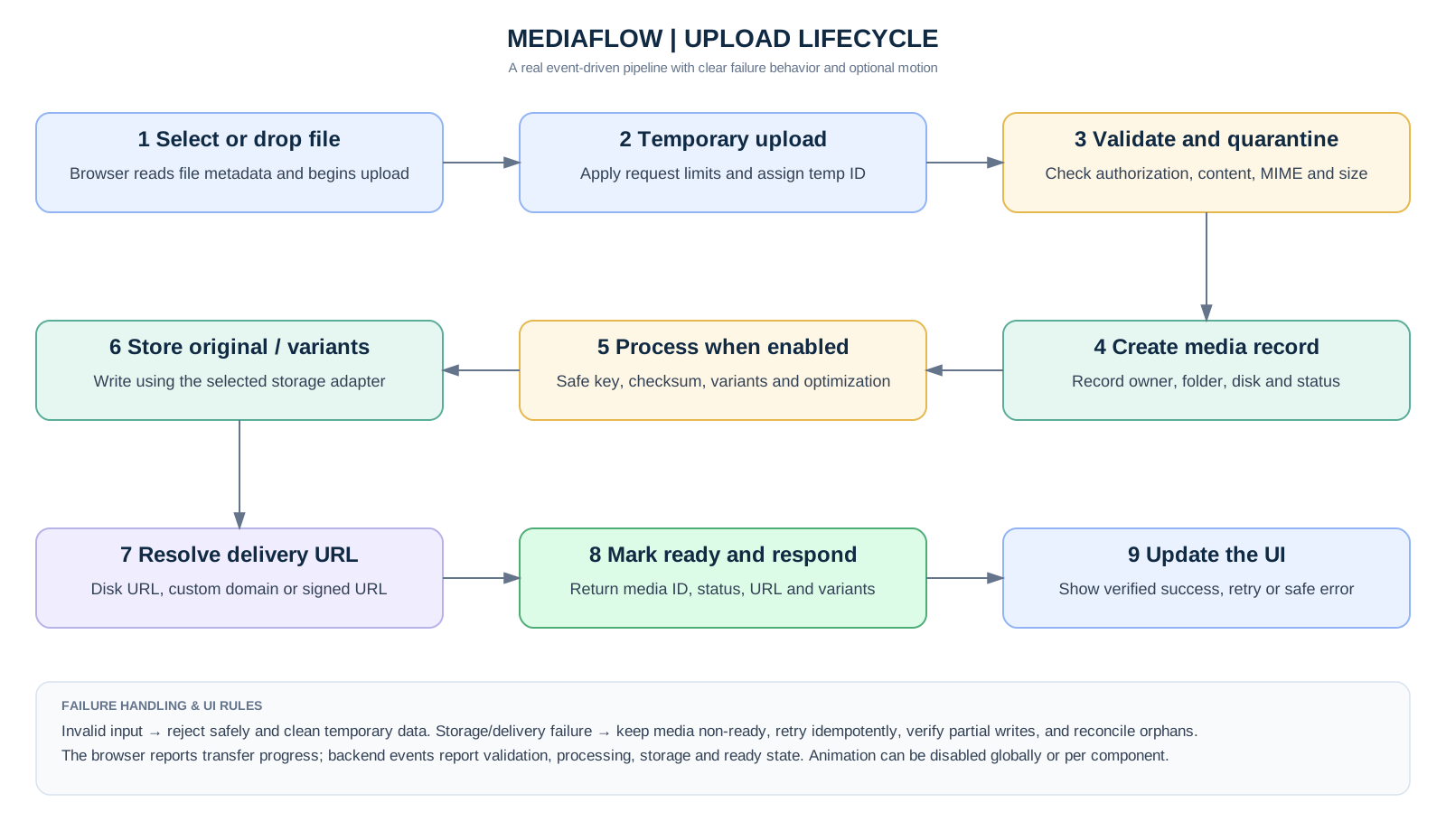
MediaFlow features a real-time hardware-accelerated 3D isometric simulation of the entire upload process across 5 operational stations:
| Station | Stage Name | Operational Description |
|---|---|---|
| 1 | Client File Pick & Buffer | Acquires raw byte stream from OS file picker or drag & drop event. |
| 2 | Quarantine Temp Staging | Places bytes in quarantined disk buffer, validates real MIME header & size limits. |
| 3 | UUID Renaming & Catalog | Generates collision-proof UUID v4 hash and creates catalog database entry. |
| 4 | GD / Imagick Variant Processing | Strips EXIF metadata, extracts dimensions, and generates WebP thumbnails. |
| 5 | Storage Commit & CDN Edge | Syncs files to final storage (Local/S3) and resolves edge CDN delivery URLs. |
🔌 16. REST API Endpoints Reference
| Method | Endpoint | Parameters | Description |
|---|---|---|---|
POST |
/mediaflow/upload |
file, folder, collection |
Uploads media file and generates thumbnails. |
GET |
/mediaflow/manager |
folder_id, search, type |
Returns media items and subfolders (HTML or JSON). |
GET |
/mediaflow/media/{id} |
id |
Retrieves single media item metadata & variant URLs. |
PATCH |
/mediaflow/media/{id} |
display_name, folder_id |
Renames or moves media item. |
DELETE |
/mediaflow/media/{id} |
id |
Deletes media and removes physical storage objects. |
POST |
/mediaflow/media/{id}/optimize |
format, quality, replace |
Compresses raster image to WebP/AVIF. |
POST |
/mediaflow/folders |
name, parent_id |
Creates a new folder. |
POST |
/mediaflow/diagnostics/test |
disk |
Runs live write/read/delete latency health test. |
🛠️ 17. Health Diagnostics & Storage Latency Probes
MediaFlow includes an automated storage health probe that writes a temporary probe file, verifies byte contents, checks URL resolution, and records exact round-trip latency in milliseconds without exposing credentials: